 ☰
☰Payblr Developer Portal
Get Started: Working with Payblr APIs
Payblr uses OAuth 2.0 Client Credentials to provide secure access to protected API resources. Before calling Payblr APIs, your team must receive application credentials, request an access token, and include that token in the Authorization header of each API request.
1. Receive Your Application Credentials
Payblr provisions your application and provides the credentials required to authenticate with the platform. These values are specific to your client application and environment.
Your Payblr contact will provide the following:
client_id: Identifies the client application requesting access to Payblr APIs.
client_secret: Confidential value used by the client application to authenticate with the authorization server.
scope: Defines the API access permissions assigned to the registered client application.
2. Obtain an Access Token
Once you have your Client ID, Client Secret, and Scope, your system can request an access token from the Payblr authorization endpoint. The returned token is used to authenticate API requests.
Authentication Method
Payblr uses the OAuth 2.0 Client Credentials grant type.
Example Token Request:
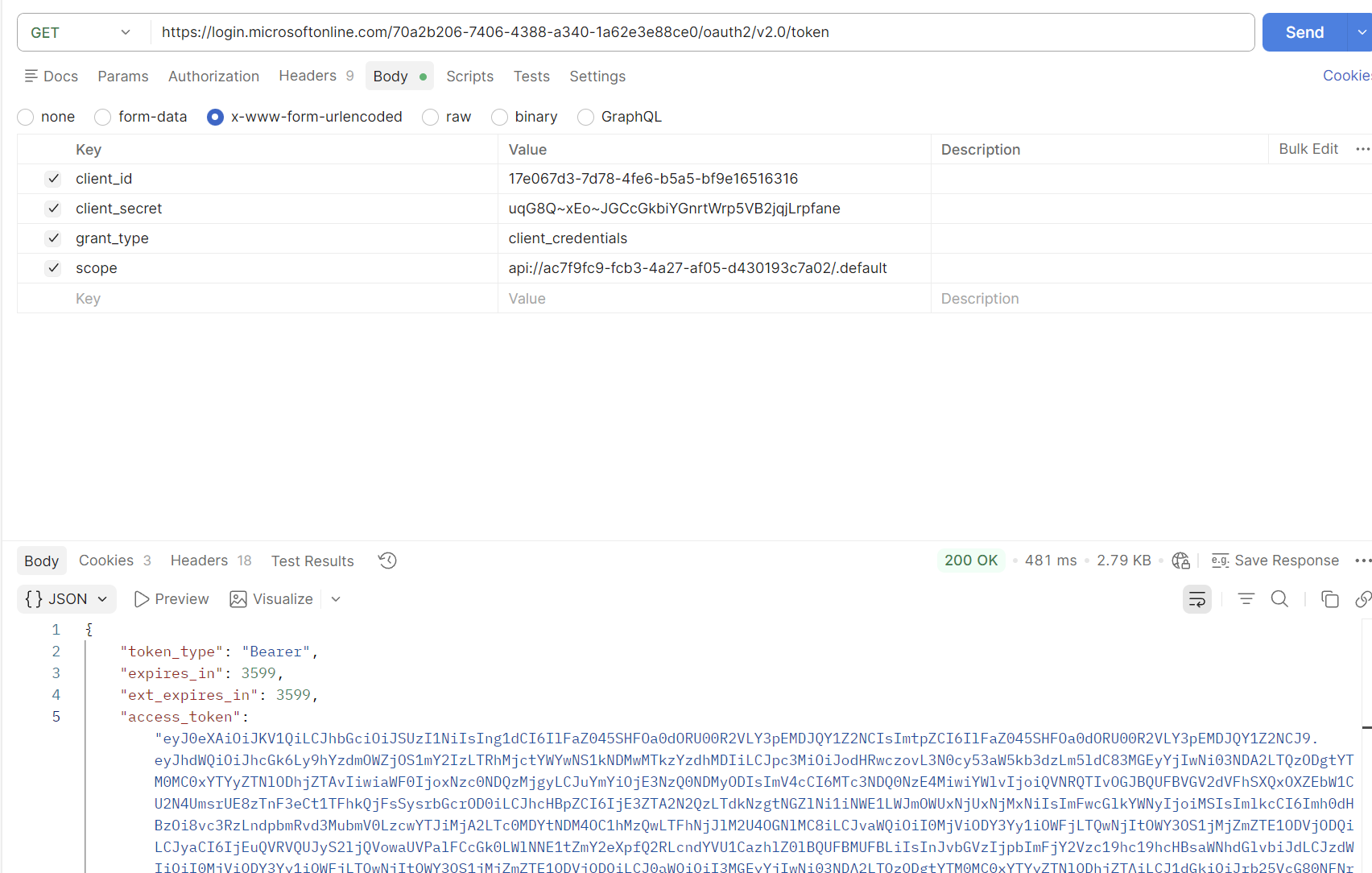
httpPOST [PAYBLR_TOKEN_ENDPOINT]Content-Type: application/x-www-form-urlencodedgrant_type=client_credentials&client_id=[YOUR_CLIENT_ID]&client_secret=[YOUR_CLIENT_SECRET]&scope=[YOUR_CLIENT_SCOPE]
Example Successful Response:
{"access_token": "[ACCESS_TOKEN]","token_type": "Bearer","expires_in": 3600}
Your system should store the token securely and use it only for the duration of its validity. When the token expires, request a new token before calling Payblr APIs. Use the token returned by Payblr in the Authorization header of every API call.
URL
The Authorization endpoint can be used by external client teams to generate access tokens. The token API endpoint for UAT is https://login.microsoftonline.com/uat-api-auth.payblr.com/oauth2/v2.0/token
Please refer to the following POSTMAN Example.
3. Call Payblr APIs
After obtaining an access token, include it in the Authorization header when calling Payblr APIs.
Example API Request Pattern:
GET [PAYBLR_API_BASE_URL]/[RESOURCE_PATH]Authorization: Bearer [ACCESS_TOKEN]Content-Type: application/json